Meshcore
MeshCore lets neighbors connect directly with one another using radio, creating a resilient local network that doesn't rely on cellular service or the internet.
Whether you're interested in emergency preparedness, experimenting with new technology, or simply meeting like-minded people, MeshCore is a great way to get involved. As we expand coverage throughout the valley and surrounding mountains, you'll also gain a new appreciation for Roanoke's unique topography—discovering how ridgelines, peaks, and valleys shape radio communications while exploring the region in the process.
Looking for your first companion radio?
Check out the getting started radio recommendations.
Meshcore is growing in our area
May 2026 - A new meshcore repeater was installed on Poor Mountain, connecting the local meshcore network to the larger regional networks.
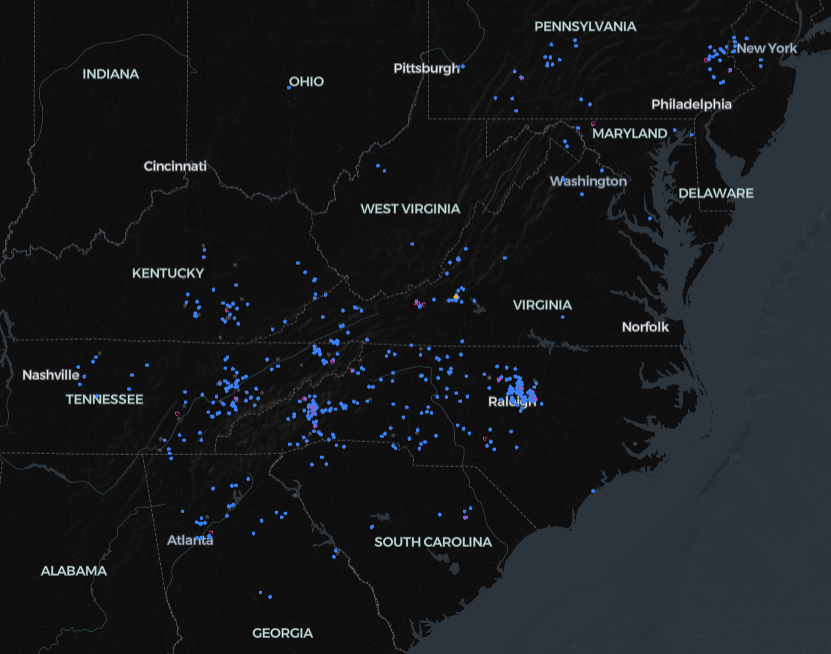
Please use discord to report in if you are building out MC somewhere in our area.
Local Channels
Use the following channels to chat with fellow mesh users in the area. Please see the list of regions if you are setting up a repeater.
| Channel | Region Scope | Note |
|---|---|---|
| #va Click to add |
none yet | VA State |
| #va-scoped Click to add |
us-va | VA State, Scoped Region Test |
| #swva Click to add |
none yet | Southwest Virginia, Richlands Area |
| #southwestva Click to add |
none yet | Southwest Virginia, Roanoke Area |
| #roanokeva Click to add |
none yet | Roanoke area chat |
| #cavespringva Click to add |
none yet | Neighborhood chat |
More Topic Channels
| Channel | Region Scope | Note |
|---|---|---|
| #test Click to add |
none yet | Send the word 'Test' for bot responses |
| #hamradio Click to add |
none yet | |
| #bot Click to add |
none yet | Chat/AI bots |
| #wardriving Click to add |
none yet | Track wardriving users |
| #wx Click to add |
none yet | Weather bots |
| #linux Click to add |
none yet | Linux Users Group |